Showing posts with label ASP.NET MVC. Show all posts

Tuesday, October 4, 2016

Is .NET Core ready for Business/Enterprise development?

If you have read all of the hype on .NET Core/ASP.NET Core, you may be wondering if ASP.NET Core is TRULY ready for Business/Enterprise development.

The best way to judge this for yourself is to read the recent MSDN Blogs:

https://blogs.msdn.microsoft.com/dotnet/2016/09/21/reusing-configuration-files-in-asp-net-core/

In this article, you can see that you have to COMPLETELY re-write functionality for reading configuration files if you decide to move to ASP.NET Core 1.0!!

Next up, if you look at the roadmap for .NET Core, you will see that there are several enhancements already planned for an upcoming release of .NET Core:  https://blogs.msdn.microsoft.com/dotnet/2016/09/26/introducing-net-standard/

Therefore, Microsoft is basically acknowledging that .NET Core 1.0 is NOT ready for most businesses/enterprises to adopt since a lot of the functionality that developers have used in the past with ASP.NET MVC 5 and ASP.NET Web API 2.2 and other features in the .NET Framework are simply not available in .NET Core today.

This is rather unfortunate since .NET Core brings a lot of exciting features to the table including cross-platform compatibility.  However, the fact is that most developers will end up writing a TON of code to fill in the gaps currently left open by .NET Core 1.0.

On the bright side, much like ASP.NET MVC in its infancy several years ago, it seems that .NET Core will evolve rather quickly to be able to be used in the near future.  I am crossing my fingers and hoping that these features get added sooner rather than later, but given how many years I have been working with Microsoft products, I know not to have too many high expectations.  After all, there are features in some products that took 10 or more years before they were introduced into platforms such as SQL Server, Visual Studio, Team Foundation Server etc. and even in ASP.NET MVC 5 today, there are many features lacking that make it as usable a web development framework as ASP.NET Web Forms...

Tuesday, September 27, 2016

Using ASP.NET MVC Futures to eliminate Magic Strings

If you have used RedirectToAction throughout your ASP.NET MVC Controllers, you have probably experienced the frustration of having to manually type in string names of controllers as follows:


However, with ASP.NET MVC Futures, you can eliminate typing in these "Magic Strings" for these Redirects and instead rely on strong typing and using lambda expressions!

In order to get started, you first have to install Microsoft.AspNet.Mvc.Futures as a NuGet package:


Once you have installed this NuGet package, you will end up with a reference to "Microsoft.Web.Mvc".  You will have to add a using statement for this library to the top of your MVC Controller file.

Once you have done that, you can easily replace this RedirectToAction functionality in your Controller methods as follows:


That is all there is to cleaning up numerous "Magic Strings" from your ASP.NET MVC Web Application!

Friday, September 23, 2016

Mocking TempData in ASP.NET MVC Unit Tests

If you want to mock TempData in your ASP.NET MVC Unit Tests, you will encounter some difficulties with accomplishing this since TempData is based on the Controller context and therefore cannot be readily mocked.

If you start doing some digging for solutions on how to accomplish this, you will inevitable come across this article: http://weblogs.asp.net/leftslipper/mvc-unit-testing-controller-actions-that-use-tempdata

Of course, this works just fine if you only want to deal with TempData, but what if you find yourself needing to mock other objects that are dependent on the Controller context as well such as Session State?

Well, this is where MvcContrib TestHelper comes to the rescue!  https://cgeers.wordpress.com/2011/08/07/asp-net-mvc-mocking-session-state/

Using just a few lines of code, this NuGet package will help you set up all of your MVC Controller dependencies such as TempData as well as Session State and several others!

Unfortunately, when you attempt to install this NuGet package into your Unit Testing project, you will end up seeing some unwanted dependencies (including an older version of ASP.NET MVC):


Fortunately, another clever developer has updated this library to support ASP.NET MVC 4 and later versions!

The name of this NuGet package is StudioDonder.MvcContrib.Mvc4.TestHelper.  You can download this NuGet package from here: https://www.nuget.org/packages/StudioDonder.MvcContrib.Mvc4.TestHelper/

Even though it was originally built for ASP.NET MVC 4, it works just fine with ASP.NET MVC 5 as well:


After installing this NuGet package, you can use it just as if it was the original MvcContrib.TestHelper NuGet package in your code as follows:


Tuesday, September 20, 2016

Persisting State in an ASP.NET MVC Web Application using TempData

When we think about persisting state in an ASP.NET MVC Web Application, most developers think of persistence using Session, Cache or Cookies, but many developers forget about using TempData as an easy means to persist information across ASP.NET MVC Requests!

Many developers frequently use the ViewBag and ViewData dictionary objects, but very few are aware of the TempData object.  The TempData object is especially handy when working with the PRG (Post Request Get) Pattern whereby you post from a controller method and then redirect to another controller method.

The problem with using objects such as ViewBag and ViewData is that they are only valid for that particular controller method request and will not be persistent across subsequent requests.  That is where TempData fits into the picture!

This MSDN article specifically addresses different methods for Passing Data in an ASP.NET MVC Application: https://msdn.microsoft.com/en-us/library/dd394711(v=vs.100).aspx

As you can see from the article, the usage of TempData is specifically geared towards "Passing State Between Action Methods"

You can read more about the TempData Dictionary object here: https://msdn.microsoft.com/en-us/library/system.web.mvc.tempdatadictionary(v=vs.118).aspx

This article also does a great job of explaining the differences between ViewData, ViewBag and TempData and their specific use case scenarios: http://rachelappel.com/when-to-use-viewbag-viewdata-or-tempdata-in-asp-net-mvc-3-applications/

Friday, September 16, 2016

Using Ajax in ASP.NET MVC Web Applications

If you want to use Ajax in your ASP.NET MVC Web Applications, you can use JavaScript frameworks such as jQuery or AngularJS separately to add Ajax support to your applications, or you can use the built-in support for Ajax provided out-of-the-box by ASP.NET MVC!

To get basic support for Ajax in your ASP.NET MVC, you will need to leverage the Ajax Razor Html Helpers, namely, Ajax.BeginForm and Ajax.ActionLink as follows:

Ajax.BeginForm:

Ajax.ActionLink:

Then, if you want to check whether or not the request was an Ajax Request in your ASP.NET MVC Controller, you can use code such as the following:

Displaying ModelState Validation errors in ASP.NET MVC

If you want to display ModelState Validation errors (ex: ModelState.AddModelError...) in your ASP.NET MVC Views, the easiest way to display them is to use the @Html.ValidationSummary() or @Html.ValidationSummary(false) Html Helpers.

However, if you add specific keys to your ModelState that you want to display outside of a ValidationSummary control, you can do something like the following:

 ModelState.AddModelError("MyCustomKey", "My Custom error");

Then, in order to display it in your view, you can simply use the @Html.ValidationMessage Razor Html Helper as follows:

@Html.ValidationMessage("MyCustomKey")

That is all there is to it!

Understanding options for Html.ValidationSummary in ASP.NET MVC Views

If you are confused about how the @Html.ValidationSummary Razor Html Helper works, you are certainly not the only one!

You can read about the various options for the ValidationSummary control here: https://msdn.microsoft.com/en-us/library/ee839469%28v=vs.118%29.aspx

There are 3 MAJOR uses of @Html.ValidationSummary as follows:

  • @Html.ValidationSummary()
  • @Html.ValidationSummary(true)
  • @Html.ValidationSummary(false)

@Html.ValidationSummary()

No parameters for the ValidationSummary control is the equivalent of passing false as a parameter.  That is, the ValidationSummary control will display ALL Model errors including ModelState-level errors.


@Html.ValidationSummary(true)

For the true parameter, you can see the definition directly from Visual Studio Intellisense:


This causes the ValidationSummary to ONLY display Model errors and exclude any ModelState-level errors.  Therefore, if you use some code in your MVC Controller such as ModelState.AddModelError("", "some error"); will not be added to the ValidationSummary control for display in your Razor view.


@Html.ValidationSummary(false)

As with the no parameter version of the ValidationSummary Razor HTML Helper, the ValidationSummary control will display ALL Model errors including ModelState-level errors.

That is all there is to understanding how to use the ValidationSummary Html Helper in your ASP.NET MVC Web Applications!!


Using the same view for creating and editing in ASP.NET MVC

When you use the standard pattern for ASP.NET MVC, you will generally create separate Razor Views for Creating and Editing, but a lot of applications leverage the SAME view for Creating as well as Editing.

For example, if you submit a Create screen, you may immediately want to transition to an Edit screen so that the details can be edited further.

So, how exactly do you accomplish this using ASP.NET MVC?

Basically, you have to leverage a RedirectToAction call to redirect to another method name which can handle the management of the model.  This is because you cannot have 2 different methods with the same name and the same method signature (HttpGet and HttpPost attributes are not sufficient to distinguish between Controller methods).

Then, from the new Controller Action method, you can simply redirect to the original calling method!  You can think of this in programming terms somewhat like a Recursive loop!  The only way to break out of the loop is for the user to navigate to another view through the user interface.

Therefore, you will have code similar to the following:


Wednesday, September 14, 2016

Passing ViewData to a Partial View

If you want to pass ViewData (via the ViewDataDictionary) to a Partial View, searching through forums, you may end up getting confusing or conflicting answers.

Fortunately, the solution is relatively simple whether you are using @Html.RenderPartial or @Html.Partial!


Then if you want to access that ViewData in your Partial View, you simply access it by doing something like the following:

Thursday, September 8, 2016

Routing to a default Area in ASP.NET MVC

When you take a look at RouteConfig.cs in an ASP.NET MVC Web Application, you will notice that you cannot set a default Area when you initially load the application.

Instead, ASP.NET MVC will usually default to the Index action of the Home Controller in the root directory by default!

So how do you work around this limitation?

Well, there are numerous solutions to doing this by altering and modifying the default behavior or RouteConfig.cs, but I feel the simplest solution is best.

Simply go into the Index action of the Home controller and add a Redirect similar to the following:


Tuesday, September 6, 2016

Kendo UI TabStrip with ASP.NET MVC Partial Views

If you look at the demos for the Kendo UI TabStrip, you will notice that they miss several key scenarios for addressing common issues in ASP.NET MVC Web Applications: http://demos.telerik.com/aspnet-mvc/tabstrip/index

One of the main scenarios the demos fail to address is the usage of Partial Views to render content in the TabStrip control!

Well, after going through some Kendo UI Forums, I was able to come up with this solution:


One of the things that I discovered was that I could not get the TabStrip to work with @{Html.RenderPartial("MVCView1");} and was forced to work with @Html.Partial("MVCView1"). I was not able to figure out the root cause of this discrepancy but if you have a solution to this problem, feel free to post it in the Comments section below!

Kendo UI PanelBar with ASP.NET MVC Partial Views

If you look at the demos for the Kendo UI PanelBar, you will notice that they miss several key scenarios for addressing common issues in ASP.NET MVC Web Applications:  http://demos.telerik.com/aspnet-mvc/panelbar/index

One of the main scenarios the demos fail to address is the usage of Partial Views to render content in the PanelBar control!

Well, after going through some Kendo UI Forums, I was able to come up with this solution:


One of the things that I discovered was that I could not get the PanelBar to work with @{Html.RenderPartial("MVCView1");} and was forced to work with @Html.Partial("MVCView1"). I was not able to figure out the root cause of this discrepancy but if you have a solution to this problem, feel free to post it in the Comments section below!

Monday, September 5, 2016

Unit Testing Custom ASP.NET MVC Validation Attributes

When you are using custom ASP.NET MVC Validation Attributes, you may encounter a problem when attempting to Unit Test this functionality since inheriting from the ValidationAttribute class may require a method such as the following:


This works just fine when testing the public implementation of IsValid, but what if you are implementing the protected method of IsValid? Well, as you will quickly discover, you will not be able to easily Unit Test protected methods:


So how do you work around this limitation?

Well, thanks to this handy article (http://www.codeproject.com/Articles/9715/How-to-Test-Private-and-Protected-methods-in-NET), you can do something like the following:


Now, when you write your Unit Test, you will do something like this to ACTUALLY Unit Test your Custom Validation Attribute:

Wednesday, August 31, 2016

Implementing Remote Validation using Data Annotations in ASP.NET MVC

If you want to implement Remote Validation using Data Annotations on your ViewModels in ASP.NET MVC, you can follow this article: https://msdn.microsoft.com/en-us/library/gg508808(vs.98).aspx

Even though this article references ASP.NET MVC 3, it still applies to ASP.NET MVC 5.

In order to ensure that you do not encounter conflicts with the System.ComponentModel.DataAnnotations namespace while using the Remote attribute, you should decorate your ViewModels with the fully qualified namespace for the attribute in this manner:

[System.Web.Mvc.Remote("IsUID_Available", "Validation")]

Then, once you have the necessary appSettings configured in your Web.config (these are set by default in most ASP.NET MVC projects), you should be able to leverage your MVC Controller Validation code as follows:


IMPOTANT NOTE: The parameter to the Remote validation method should MATCH the attribute name in the ViewModel, otherwise, you will end up getting a null value passed to your Remote validation method!

This will then perform the validation via an AJAX call seamlessly within your ASP.NET MVC Web Application!

Tuesday, August 30, 2016

Server-side paging with ASP.NET Web API and Kendo UI Grids

If you need to implement a custom server-side paging solution with Kendo UI, it may not be readily obvious as to how to accomplish this!

Kendo UI has some code samples which partially addresses this scenario: https://github.com/telerik/ui-for-aspnet-mvc-examples/tree/master/grid/custom-ajax-binding/KendoGridCustomAjaxBinding

However, this example is tightly coupled to Entity Framework and does not work so well with ASP.NET Web API...

So how exactly can you adapt the Controller code sample to your own needs that work with ASP.NET Web API?

First of all, you need to make sure your Kendo Grid is setup as follows:
Notice that you have to set ServerOperation(true)

Next, you have to set up your Controller code as follows:

That is all there is to it!

Monday, August 29, 2016

Unit Testing Data Annotation Validation/View Model Validation

If you are building functionality for validating your ViewModels either using IValidateableObject or through using Data Annotations/ValidationAttribute, you will probably want to be able to Unit Test this functionality as well!

Well, thankfully, this can be done quite easily by following this article: https://visualstudiomagazine.com/articles/2015/06/19/tdd-asp-net-mvc-part-4-unit-testing.aspx


Unit Testing ASP.NET MVC with Request.IsAjaxRequest()

One of the difficulties in Unit Testing ASP.NET MVC Web Applications is any dependence on HttpContext.

Code that you may encounter frequently in your ASP.NET MVC Controller methods is a check for whether or not the Request object is an AJAX Request.

So how exactly do you Unit Test this for your ASP.NET MVC Web Applications?

Well, there is an article on how to do just that!  http://thegrayzone.co.uk/blog/2010/03/mocking-request-isajaxrequest/

Once you set the Request Headers for the Mocked HttpRequestBase object, you will be able to return true for the Ajax request and complete your Unit Tests!


Wednesday, August 24, 2016

Unit Testing ASP.NET MVC

If you have ever had to write a Unit Test for your ASP.NET MVC Web Application, you may quickly discover that writing Unit Tests for ASP.NET MVC for all but the most basic scenarios is quite difficult!

This is because Unit Tests, by default, do not understand how to test the various conventions used in ASP.NET MVC for routing to Views etc.

So how exactly do you solve this dilemma?

Well, thankfully, there is a NuGet package that allows you to fill in the gaps left by the Unit Testing framework!  The name of this NuGet package is TestStack.FluentMVCTesting: http://fluentmvctesting.teststack.net/

Here is a list of some of the basic types of statements you can include in your MVC Unit Tests using TestStack.FluentMVCTesting: http://fluentmvctesting.teststack.net/docs/examples

Working with Resource Files in ASP.NET MVC

If you need to localize your ASP.NET MVC Web Application, then you will probably need to use Resource files.

You have to start by first adding a Resources File to your Web Application:


The primary resource file should be named without a language code to specify the default language (ex: DefaultResources.resx) For many organizations, the default resource file will correspond to the en-US language resource file.

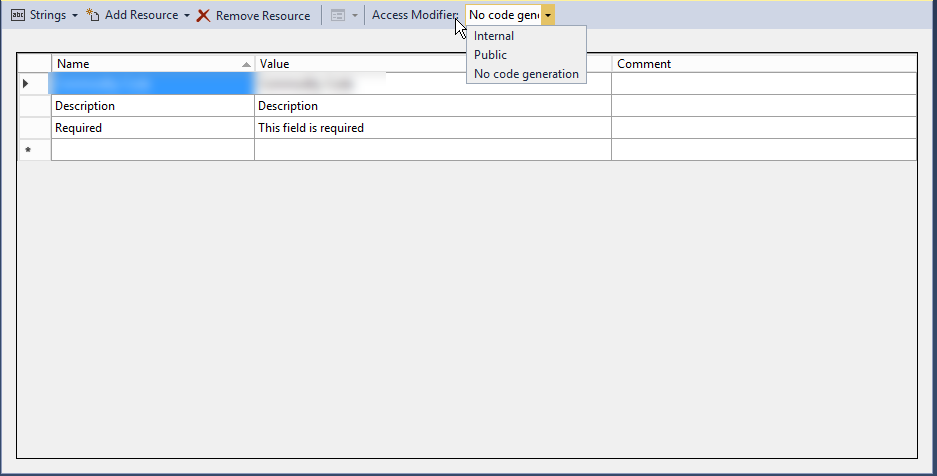
Once it has been added to your Web Application, you will need to make sure that you change the "Access Modifier" to "Public".  By default, the Access Modifier is set to "No code generation".  If this is left at the default, the Resource file will not be available to use within the application as a strongly typed file:


Next, you need to add additional Resource files for each additional language that you are planning to support:


The list of language codes that you can support for your application are listed here: https://msdn.microsoft.com/en-us/library/hh441729.aspx

Next, on the properties for the Resource files, you will have to change the "Build Action" from "Content" to "Embedded Resource":


Once you have done that, the Resource File should now be strongly typed for use within your ASP.NET MVC Web Application and you should be able to reference it as follows throughout your Controller Code and Razor Views: ex: App_LocalResources.DataAnnotation_Localization.RequiredMessage

That is all there is to it!!

Wednesday, August 17, 2016